Difference between revisions of "IPPBX IMM Scheduled Calls"
Jump to navigation
Jump to search
Scheduled Calling
Edit Scheduled Call
Drew Harrell (talk | contribs) (Created page with "=== Scheduled Calling<br/> === This is a licensed feature that allows for periodic automated calls to be made by the PBX. This can be used for announcements, bells, alarms et...") |
|||
| (7 intermediate revisions by 3 users not shown) | |||
| Line 1: | Line 1: | ||
| + | __NOTITLE__ | ||
| + | |||
=== Scheduled Calling<br/> === | === Scheduled Calling<br/> === | ||
This is a licensed feature that allows for periodic automated calls to be made by the PBX. This can be used for announcements, bells, alarms etc. | This is a licensed feature that allows for periodic automated calls to be made by the PBX. This can be used for announcements, bells, alarms etc. | ||
| + | |||
| + | [[File:scheduledcalling.png|center]] | ||
'''Enabling Scheduled Calling''' | '''Enabling Scheduled Calling''' | ||
| Line 12: | Line 16: | ||
#Click on the '''Apply Changes''' link at the top of the page to save the information and commit the changes to the database | #Click on the '''Apply Changes''' link at the top of the page to save the information and commit the changes to the database | ||
| + | <br/><span style="display: none" data-cke-bookmark="1"> </span><span style="display: none" data-cke-bookmark="1"> </span><span style="display: none" data-cke-bookmark="1"> </span><span style="display: none" data-cke-bookmark="1"> </span><span style="display: none" data-cke-bookmark="1"> </span><span style="display: none" data-cke-bookmark="1"> </span><span style="display: none" data-cke-bookmark="1"> </span><span style="display: none" data-cke-bookmark="1"> </span><span style="display: none" data-cke-bookmark="1"> </span><span style="display: none" data-cke-bookmark="1"> </span><span style="display: none" data-cke-bookmark="1"> </span><span style="display: none" data-cke-bookmark="1"> </span><span style="display: none" data-cke-bookmark="1"> </span><span style="display: none" data-cke-bookmark="1"> </span><span style="display: none" data-cke-bookmark="1"> </span><span style="display: none" data-cke-bookmark="1"> </span><span style="display: none" data-cke-bookmark="1"> </span><span style="display: none" data-cke-bookmark="1"> </span> | ||
| − | |||
{| style="border-spacing:0" | {| style="border-spacing:0" | ||
|- | |- | ||
| − | | style="background-color:#b8cce4; | + | | style="background-color:#b8cce4; border-top:0.0069in solid #0000ff; border-bottom:0.0069in solid #0000ff; border-left:0.0069in solid #0000ff; border-right:none; padding-top:0in; padding-bottom:0in; padding-left:0.075in; padding-right:0.075in" | <center>'''Sections/Fields'''</center> |
| − | | style="background-color:#b8cce4; | + | | style="background-color:#b8cce4; border:0.0069in solid #0000ff; padding-top:0in; padding-bottom:0in; padding-left:0.075in; padding-right:0.075in" | <center>'''Description'''</center> |
|- | |- | ||
| − | | style="border-top:0.0069in solid #0000ff; | + | | style="border-top:0.0069in solid #0000ff; border-bottom:0.0069in solid #0000ff; border-left:0.0069in solid #0000ff; border-right:none; padding-top:0in; padding-bottom:0in; padding-left:0.075in; padding-right:0.075in" | '''<span style="display: none" data-cke-bookmark="1"> </span>Select'''<br/> |
| − | | style="border:0.0069in solid #0000ff; | + | | style="border:0.0069in solid #0000ff; padding-top:0in; padding-bottom:0in; padding-left:0.075in; padding-right:0.075in" | Use this column to select which multiple entries to delete or edit. |
|- | |- | ||
| − | | style="border-top:0.0069in solid #0000ff; | + | | style="border-top:0.0069in solid #0000ff; border-bottom:0.0069in solid #0000ff; border-left:0.0069in solid #0000ff; border-right:none; padding-top:0in; padding-bottom:0in; padding-left:0.075in; padding-right:0.075in" | '''<span style="display: none" data-cke-bookmark="1"> </span>Enabled'''<br/> |
| − | | style="border:0.0069in solid #0000ff; | + | | style="border:0.0069in solid #0000ff; padding-top:0in; padding-bottom:0in; padding-left:0.075in; padding-right:0.075in" | Displays if the entry is active. |
1: Enabled | 1: Enabled | ||
| Line 29: | Line 33: | ||
|- | |- | ||
| − | | style="border-top:0.0069in solid #0000ff; | + | | style="border-top:0.0069in solid #0000ff; border-bottom:0.0069in solid #0000ff; border-left:0.0069in solid #0000ff; border-right:none; padding-top:0in; padding-bottom:0in; padding-left:0.075in; padding-right:0.075in" | '''<span style="display: none" data-cke-bookmark="1"> </span>Name'''<br/> |
| − | | style="border:0.0069in solid #0000ff; | + | | style="border:0.0069in solid #0000ff; padding-top:0in; padding-bottom:0in; padding-left:0.075in; padding-right:0.075in" | Displays the name of the Scheduled Call. |
|- | |- | ||
| − | | style="border-top:0.0069in solid #0000ff; | + | | style="border-top:0.0069in solid #0000ff; border-bottom:0.0069in solid #0000ff; border-left:0.0069in solid #0000ff; border-right:none; padding-top:0in; padding-bottom:0in; padding-left:0.075in; padding-right:0.075in" | '''<span style="display: none" data-cke-bookmark="1"> </span>Start'''<br/> |
| − | | style="border:0.0069in solid #0000ff; | + | | style="border:0.0069in solid #0000ff; padding-top:0in; padding-bottom:0in; padding-left:0.075in; padding-right:0.075in" | Displays the date which a particular entry is set to start. |
|- | |- | ||
| − | | style="border-top:0.0069in solid #0000ff; | + | | style="border-top:0.0069in solid #0000ff; border-bottom:0.0069in solid #0000ff; border-left:0.0069in solid #0000ff; border-right:none; padding-top:0in; padding-bottom:0in; padding-left:0.075in; padding-right:0.075in" | '''<span style="display: none" data-cke-bookmark="1"> </span>End'''<br/> |
| − | | style="border:0.0069in solid #0000ff; | + | | style="border:0.0069in solid #0000ff; padding-top:0in; padding-bottom:0in; padding-left:0.075in; padding-right:0.075in" | Display the date which a particular entry is set to end |
|- | |- | ||
| − | | style="border-top:0.0069in solid #0000ff; | + | | style="border-top:0.0069in solid #0000ff; border-bottom:0.0069in solid #0000ff; border-left:0.0069in solid #0000ff; border-right:none; padding-top:0in; padding-bottom:0in; padding-left:0.075in; padding-right:0.075in" | '''<span style="display: none" data-cke-bookmark="1"> </span>Interval'''<br/> |
| − | | style="border:0.0069in solid #0000ff; | + | | style="border:0.0069in solid #0000ff; padding-top:0in; padding-bottom:0in; padding-left:0.075in; padding-right:0.075in" | Displays information on when the Scheduled Call will take place. |
|- | |- | ||
| − | | style="border-top:0.0069in solid #0000ff; | + | | style="border-top:0.0069in solid #0000ff; border-bottom:0.0069in solid #0000ff; border-left:0.0069in solid #0000ff; border-right:none; padding-top:0in; padding-bottom:0in; padding-left:0.075in; padding-right:0.075in" | '''<span style="display: none" data-cke-bookmark="1"> </span>Execute'''<br/> |
| − | | style="border:0.0069in solid #0000ff; | + | | style="border:0.0069in solid #0000ff; padding-top:0in; padding-bottom:0in; padding-left:0.075in; padding-right:0.075in" | Shows the time the Scheduled Call will happen. |
|- | |- | ||
| − | | style="border-top:0.0069in solid #0000ff; | + | | style="border-top:0.0069in solid #0000ff; border-bottom:0.0069in solid #0000ff; border-left:0.0069in solid #0000ff; border-right:none; padding-top:0in; padding-bottom:0in; padding-left:0.075in; padding-right:0.075in" | '''<span style="display: none" data-cke-bookmark="1"> </span>Call'''<br/> |
| − | | style="border:0.0069in solid #0000ff; | + | | style="border:0.0069in solid #0000ff; padding-top:0in; padding-bottom:0in; padding-left:0.075in; padding-right:0.075in" | Displays the '''Number to Call''' as defined in the Scheduled Call. |
|- | |- | ||
| − | | style="border-top:0.0069in solid #0000ff; | + | | style="border-top:0.0069in solid #0000ff; border-bottom:0.0069in solid #0000ff; border-left:0.0069in solid #0000ff; border-right:none; padding-top:0in; padding-bottom:0in; padding-left:0.075in; padding-right:0.075in" | '''<span style="display: none" data-cke-bookmark="1"> </span>Connect to'''<br/> |
| − | | style="border:0.0069in solid #0000ff; | + | | style="border:0.0069in solid #0000ff; padding-top:0in; padding-bottom:0in; padding-left:0.075in; padding-right:0.075in" | Displays the '''Number to Connect''' as defined in the Scheduled Call. |
|- | |- | ||
| − | | style="border-top:0.0069in solid #0000ff; | + | | style="border-top:0.0069in solid #0000ff; border-bottom:0.0069in solid #0000ff; border-left:0.0069in solid #0000ff; border-right:none; padding-top:0in; padding-bottom:0in; padding-left:0.075in; padding-right:0.075in" | '''<span style="display: none" data-cke-bookmark="1"> </span>Can Dial'''<br/> |
| − | | style="border:0.0069in solid #0000ff; | + | | style="border:0.0069in solid #0000ff; padding-top:0in; padding-bottom:0in; padding-left:0.075in; padding-right:0.075in" | Event can be triggered by dialing a number |
|- | |- | ||
| − | | style="border-top:0.0069in solid #0000ff; | + | | style="border-top:0.0069in solid #0000ff; border-bottom:0.0069in solid #0000ff; border-left:0.0069in solid #0000ff; border-right:none; padding-top:0in; padding-bottom:0in; padding-left:0.075in; padding-right:0.075in" | |
| − | | style="border:0.0069in solid #0000ff; | + | | style="border:0.0069in solid #0000ff; padding-top:0in; padding-bottom:0in; padding-left:0.075in; padding-right:0.075in" | Click to edit individual entries. |
|- | |- | ||
| − | | style="border-top:0.0069in solid #0000ff; | + | | style="border-top:0.0069in solid #0000ff; border-bottom:0.0069in solid #0000ff; border-left:0.0069in solid #0000ff; border-right:none; padding-top:0in; padding-bottom:0in; padding-left:0.075in; padding-right:0.075in" | |
| − | | style="border:0.0069in solid #0000ff; | + | | style="border:0.0069in solid #0000ff; padding-top:0in; padding-bottom:0in; padding-left:0.075in; padding-right:0.075in" | Click to test an individual entry. A call between the Target and Destination will be established. |
|- | |- | ||
| − | | style="border- | + | | style="border-top:0.0069in solid #0000ff; border-bottom:0.0069in solid #0000ff; border-left:0.0069in solid #0000ff; border-right:none; padding-top:0in; padding-bottom:0in; padding-left:0.075in; padding-right:0.075in" | |
| − | | style="border:0.0069in solid #0000ff; | + | | style="border:0.0069in solid #0000ff; padding-top:0in; padding-bottom:0in; padding-left:0.075in; padding-right:0.075in" | Click to delete individual entries. |
|- | |- | ||
| − | | style="border-width: 0.0069in medium 0.0069in 0.0069in; | + | | style="border-width: 0.0069in medium 0.0069in 0.0069in; border-style: solid none solid solid; border-color: rgb(0, 0, 255) -moz-use-text-color rgb(0, 0, 255) rgb(0, 0, 255); padding: 0in 0.075in; text-align: center" | '''<span style="display: none" data-cke-bookmark="1"> </span>Edit'''<br/> |
| − | | style="border:0.0069in solid #0000ff; | + | | style="border:0.0069in solid #0000ff; padding-top:0in; padding-bottom:0in; padding-left:0.075in; padding-right:0.075in" | Click to edit multiple entries if checked in the Select column. |
| + | |- | ||
| + | | style="border-width: 0.0069in medium 0.0069in 0.0069in; border-style: solid none solid solid; border-color: rgb(0, 0, 255) -moz-use-text-color rgb(0, 0, 255) rgb(0, 0, 255); padding: 0in 0.075in; text-align: center" | '''<span style="display: none" data-cke-bookmark="1"> </span>Delete'''<br/> | ||
| + | | style="border:0.0069in solid #0000ff; padding-top:0in; padding-bottom:0in; padding-left:0.075in; padding-right:0.075in" | | ||
Click to delete multiple entries if checked in the Select column. | Click to delete multiple entries if checked in the Select column. | ||
|- | |- | ||
| − | | style="border-width: 0.0069in medium 0.0069in 0.0069in; | + | | style="border-width: 0.0069in medium 0.0069in 0.0069in; border-style: solid none solid solid; border-color: rgb(0, 0, 255) -moz-use-text-color rgb(0, 0, 255) rgb(0, 0, 255); padding: 0in 0.075in; text-align: center" | '''<span style="display: none" data-cke-bookmark="1"> </span>Add'''<br/> |
| − | | style="border:0.0069in solid #0000ff; | + | | style="border:0.0069in solid #0000ff; padding-top:0in; padding-bottom:0in; padding-left:0.075in; padding-right:0.075in" | Click to create a new Scheduled Call.<br/> |
|} | |} | ||
| − | + | <br /> | |
| + | === Edit Scheduled Call<br/> === | ||
{| style="border-spacing:0" | {| style="border-spacing:0" | ||
|- | |- | ||
| − | | style="background-color:#b8cce4; | + | | style="background-color:#b8cce4; border-top:0.0069in solid #0000ff; border-bottom:0.0069in solid #0000ff; border-left:0.0069in solid #0000ff; border-right:none; padding-top:0in; padding-bottom:0in; padding-left:0.075in; padding-right:0.075in" | <center> |
'''Sections/Fields''' | '''Sections/Fields''' | ||
</center> | </center> | ||
| − | | style="background-color:#b8cce4; | + | | style="background-color:#b8cce4; border:0.0069in solid #0000ff; padding-top:0in; padding-bottom:0in; padding-left:0.075in; padding-right:0.075in" | <center>'''Description'''</center> |
|- | |- | ||
| − | | style="border-width: 0.0069in medium 0.0069in 0.0069in; | + | | style="border-width: 0.0069in medium 0.0069in 0.0069in; border-style: solid none solid solid; border-color: rgb(0, 0, 255) -moz-use-text-color rgb(0, 0, 255) rgb(0, 0, 255); padding: 0in 0.075in; text-align: center" | '''Name'''<br/> |
| − | | style="border:0.0069in solid #0000ff; | + | | style="border:0.0069in solid #0000ff; padding-top:0in; padding-bottom:0in; padding-left:0.075in; padding-right:0.075in" | Enter a name to identify this Scheduled Call. |
|- | |- | ||
| − | | style="border-width: 0.0069in medium 0.0069in 0.0069in; | + | | style="border-width: 0.0069in medium 0.0069in 0.0069in; border-style: solid none solid solid; border-color: rgb(0, 0, 255) -moz-use-text-color rgb(0, 0, 255) rgb(0, 0, 255); padding: 0in 0.075in; text-align: center" | '''Date/Time'''<br/> |
| − | | style="border:0.0069in solid #0000ff; | + | | style="border:0.0069in solid #0000ff; padding-top:0in; padding-bottom:0in; padding-left:0.075in; padding-right:0.075in" | Define what date and time the Scheduled Call should start and end. Both of these are optional. Setting the Start date/time will enable the Scheduled Call at that time. Setting the End date/time will disable the Scheduled Call on that time. If you leave the start date/time blank, the Scheduled call will be enabled immediately. If you leave the end date/time blank, the Scheduled Call will continue indefinitely until manually disabled. |
|- | |- | ||
| − | | style="border-width: 0.0069in medium 0.0069in 0.0069in; | + | | style="border-width: 0.0069in medium 0.0069in 0.0069in; border-style: solid none solid solid; border-color: rgb(0, 0, 255) -moz-use-text-color rgb(0, 0, 255) rgb(0, 0, 255); padding: 0in 0.075in; text-align: center" | '''Recurrence'''<br/> |
| − | | style="border:0.0069in solid #0000ff; | + | | style="border:0.0069in solid #0000ff; padding-top:0in; padding-bottom:0in; padding-left:0.075in; padding-right:0.075in" | Defines the interval the Scheduled Call will take place. Calls can be set to Daily, Weekly, or Monthly. See the Recurrence table below for more details. |
|- | |- | ||
| − | | style="border-width: 0.0069in medium 0.0069in 0.0069in; | + | | style="border-width: 0.0069in medium 0.0069in 0.0069in; border-style: solid none solid solid; border-color: rgb(0, 0, 255) -moz-use-text-color rgb(0, 0, 255) rgb(0, 0, 255); padding: 0in 0.075in; text-align: center" | '''Execute At'''<br/> |
| − | | style="border:0.0069in solid #0000ff; | + | | style="border:0.0069in solid #0000ff; padding-top:0in; padding-bottom:0in; padding-left:0.075in; padding-right:0.075in" | Defines the time the call will take place for each Recurrence. |
|- | |- | ||
| − | | style="border-width: 0.0069in medium 0.0069in 0.0069in; | + | | style="border-width: 0.0069in medium 0.0069in 0.0069in; border-style: solid none solid solid; border-color: rgb(0, 0, 255) -moz-use-text-color rgb(0, 0, 255) rgb(0, 0, 255); padding: 0in 0.075in; text-align: center" | '''Call First'''<br/> |
| − | | style="border:0.0069in solid #0000ff; | + | | style="border:0.0069in solid #0000ff; padding-top:0in; padding-bottom:0in; padding-left:0.075in; padding-right:0.075in" | Defines the entity that will be called. |
|- | |- | ||
| − | | style="border-width: 0.0069in medium 0.0069in 0.0069in; | + | | style="border-width: 0.0069in medium 0.0069in 0.0069in; border-style: solid none solid solid; border-color: rgb(0, 0, 255) -moz-use-text-color rgb(0, 0, 255) rgb(0, 0, 255); padding: 0in 0.075in; text-align: center" | '''Connect First Call to'''<br/> |
| − | | style="border:0.0069in solid #0000ff; | + | | style="border:0.0069in solid #0000ff; padding-top:0in; padding-bottom:0in; padding-left:0.075in; padding-right:0.075in" | Defines what destination the called party will be connected to. |
|- | |- | ||
| − | | style="border-width: 0.0069in medium 0.0069in 0.0069in; | + | | style="border-width: 0.0069in medium 0.0069in 0.0069in; border-style: solid none solid solid; border-color: rgb(0, 0, 255) -moz-use-text-color rgb(0, 0, 255) rgb(0, 0, 255); padding: 0in 0.075in; text-align: center" | '''Dial using Permissions of Extension:'''<br/> |
| − | | style="border:0.0069in solid #0000ff; | + | | style="border:0.0069in solid #0000ff; padding-top:0in; padding-bottom:0in; padding-left:0.075in; padding-right:0.075in" | Set this to the extension number that is will be used by this Scheduled Call for calling permissions. Must be set whether doing internal or outbound calls. |
|- | |- | ||
| − | | style="border-width: 0.0069in medium 0.0069in 0.0069in; | + | | style="border-width: 0.0069in medium 0.0069in 0.0069in; border-style: solid none solid solid; border-color: rgb(0, 0, 255) -moz-use-text-color rgb(0, 0, 255) rgb(0, 0, 255); padding: 0in 0.075in; text-align: left" | '''Can Dial'''<br/> |
| − | | style="border:0.0069in solid #0000ff; | + | | style="border:0.0069in solid #0000ff; padding-top:0in; padding-bottom:0in; padding-left:0.075in; padding-right:0.075in" | Permits this scheduled call to be dialed. Checking the box enables this scheduled call to become a destination. |
| + | |- | ||
| + | | style="border-width: 0.0069in medium 0.0069in 0.0069in; border-style: solid none solid solid; border-color: rgb(0, 0, 255) -moz-use-text-color rgb(0, 0, 255) rgb(0, 0, 255); padding: 0in 0.075in; text-align: center" | '''To trigger event Dial'''<br/> | ||
| + | | style="border:0.0069in solid #0000ff; padding-top:0in; padding-bottom:0in; padding-left:0.075in; padding-right:0.075in" | (Required) The number to dial to trigger this event. | ||
| + | |- | ||
| + | | style="border-width: 0.0069in medium 0.0069in 0.0069in; border-style: solid none solid solid; border-color: rgb(0, 0, 255) -moz-use-text-color rgb(0, 0, 255) rgb(0, 0, 255); padding: 0in 0.075in; text-align: center" | '''Security PIN'''<br/> | ||
| + | | style="border:0.0069in solid #0000ff; padding-top:0in; padding-bottom:0in; padding-left:0.075in; padding-right:0.075in" | (Optional) Numbers only. If set, when the trigger number is dialed, the system will prompt for this PIN before executing the event. Leave blank if no PIN is needed. | ||
| + | |- | ||
| + | | style="border-width: 0.0069in medium 0.0069in 0.0069in; border-style: solid none solid solid; border-color: rgb(0, 0, 255) -moz-use-text-color rgb(0, 0, 255) rgb(0, 0, 255); padding: 0in 0.075in; text-align: center" | '''Next Destination'''<br/> | ||
| + | | style="border:0.0069in solid #0000ff; padding-top:0in; padding-bottom:0in; padding-left:0.075in; padding-right:0.075in" | (Optional) The destination the call continues on to. Leave blank if you want to end the call when the event is triggered. | ||
| + | |- | ||
| + | | style="border-width: 0.0069in medium 0.0069in 0.0069in; border-style: solid none solid solid; border-color: rgb(0, 0, 255) -moz-use-text-color rgb(0, 0, 255) rgb(0, 0, 255); padding: 0in 0.075in; text-align: center" | '''Enable/Disable'''<br/> | ||
| + | | style="border:0.0069in solid #0000ff; padding-top:0in; padding-bottom:0in; padding-left:0.075in; padding-right:0.075in" | Choose Enable for this Scheduled Call to be active, and Disable for it to be inactive. | ||
|} | |} | ||
| − | + | <br /> | |
{| style="border-spacing:0" | {| style="border-spacing:0" | ||
|- | |- | ||
| − | | style="background-color:#b8cce4; | + | | style="background-color:#b8cce4; border-top:0.0069in solid #0000ff; border-bottom:0.0069in solid #0000ff; border-left:0.0069in solid #0000ff; border-right:none; padding-top:0in; padding-bottom:0in; padding-left:0.075in; padding-right:0.075in" | <center>'''Sections/Fields'''</center> |
| − | | style="background-color:#b8cce4; | + | | style="background-color:#b8cce4; border:0.0069in solid #0000ff; padding-top:0in; padding-bottom:0in; padding-left:0.075in; padding-right:0.075in" | <center>'''Description'''</center> |
|- | |- | ||
| − | | style="border-width: 0.0069in medium 0.0069in 0.0069in; | + | | style="border-width: 0.0069in medium 0.0069in 0.0069in; border-style: solid none solid solid; border-color: rgb(0, 0, 255) -moz-use-text-color rgb(0, 0, 255) rgb(0, 0, 255); padding: 0in 0.075in; text-align: center" | '''Daily'''<br/> |
| − | | style="border:0.0069in solid #0000ff; | + | | style="border:0.0069in solid #0000ff; padding-top:0in; padding-bottom:0in; padding-left:0.075in; padding-right:0.075in" | '''Everyday:''' Will call at the defined Time every day. |
'''Every X Days:''' Will call at the defined Time every (1-1550) days. | '''Every X Days:''' Will call at the defined Time every (1-1550) days. | ||
| Line 115: | Line 135: | ||
|- | |- | ||
| − | | style="border-width: 0.0069in medium 0.0069in 0.0069in; | + | | style="border-width: 0.0069in medium 0.0069in 0.0069in; border-style: solid none solid solid; border-color: rgb(0, 0, 255) -moz-use-text-color rgb(0, 0, 255) rgb(0, 0, 255); padding: 0in 0.075in; text-align: center" | '''Weekly'''<br/> |
| − | | style="border:0.0069in solid #0000ff; | + | | style="border:0.0069in solid #0000ff; padding-top:0in; padding-bottom:0in; padding-left:0.075in; padding-right:0.075in" | '''Every X Weeks on Y:''' Will call at the defined Time every (1-1550) weeks on the day defined. |
|- | |- | ||
| − | | style="border-width: 0.0069in medium 0.0069in 0.0069in; | + | | style="border-width: 0.0069in medium 0.0069in 0.0069in; border-style: solid none solid solid; border-color: rgb(0, 0, 255) -moz-use-text-color rgb(0, 0, 255) rgb(0, 0, 255); padding: 0in 0.075in; text-align: center" | '''Monthly'''<br/> |
| − | | style="border:0.0069in solid #0000ff; | + | | style="border:0.0069in solid #0000ff; padding-top:0in; padding-bottom:0in; padding-left:0.075in; padding-right:0.075in" | '''Day:''' Will call at the defined Time every (1st-31st) day of the month. |
'''The X Week on Y:''' Will call at the defined Time on the 1<sup>st</sup>, 2<sup>nd</sup>, 3<sup>rd</sup>, or 4<sup>th</sup> week of the month on the day defined. | '''The X Week on Y:''' Will call at the defined Time on the 1<sup>st</sup>, 2<sup>nd</sup>, 3<sup>rd</sup>, or 4<sup>th</sup> week of the month on the day defined. | ||
Latest revision as of 18:49, 21 January 2015
Scheduled Calling
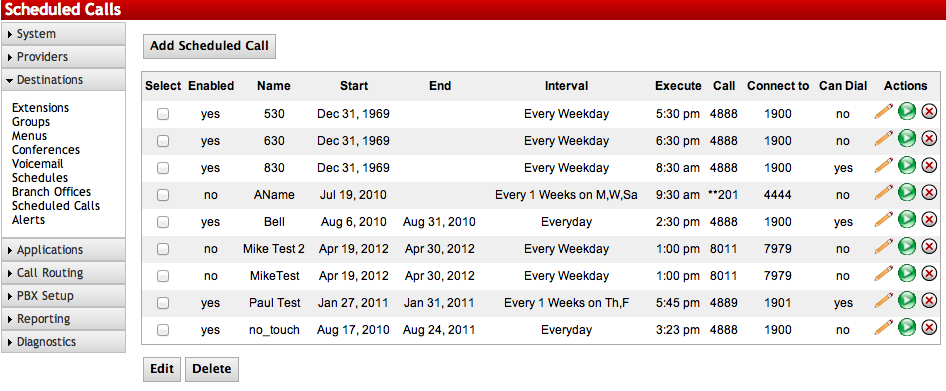
This is a licensed feature that allows for periodic automated calls to be made by the PBX. This can be used for announcements, bells, alarms etc.

Enabling Scheduled Calling
STEPS:
- From the PBX Setup=>Services page, locate the Scheduled Calling section.
- Change the dropdown to Enabled.
- Click the button to save the changes.
- Click on the Apply Changes link at the top of the page to save the information and commit the changes to the database
| Select |
Use this column to select which multiple entries to delete or edit. |
| Enabled |
Displays if the entry is active.
1: Enabled 0: Disabled |
| Name |
Displays the name of the Scheduled Call. |
| Start |
Displays the date which a particular entry is set to start. |
| End |
Display the date which a particular entry is set to end |
| Interval |
Displays information on when the Scheduled Call will take place. |
| Execute |
Shows the time the Scheduled Call will happen. |
| Call |
Displays the Number to Call as defined in the Scheduled Call. |
| Connect to |
Displays the Number to Connect as defined in the Scheduled Call. |
| Can Dial |
Event can be triggered by dialing a number |
| Click to edit individual entries. | |
| Click to test an individual entry. A call between the Target and Destination will be established. | |
| Click to delete individual entries. | |
| Edit |
Click to edit multiple entries if checked in the Select column. |
| Delete |
Click to delete multiple entries if checked in the Select column. |
| Add |
Click to create a new Scheduled Call. |
Edit Scheduled Call
Sections/Fields |
|
| Name |
Enter a name to identify this Scheduled Call. |
| Date/Time |
Define what date and time the Scheduled Call should start and end. Both of these are optional. Setting the Start date/time will enable the Scheduled Call at that time. Setting the End date/time will disable the Scheduled Call on that time. If you leave the start date/time blank, the Scheduled call will be enabled immediately. If you leave the end date/time blank, the Scheduled Call will continue indefinitely until manually disabled. |
| Recurrence |
Defines the interval the Scheduled Call will take place. Calls can be set to Daily, Weekly, or Monthly. See the Recurrence table below for more details. |
| Execute At |
Defines the time the call will take place for each Recurrence. |
| Call First |
Defines the entity that will be called. |
| Connect First Call to |
Defines what destination the called party will be connected to. |
| Dial using Permissions of Extension: |
Set this to the extension number that is will be used by this Scheduled Call for calling permissions. Must be set whether doing internal or outbound calls. |
| Can Dial |
Permits this scheduled call to be dialed. Checking the box enables this scheduled call to become a destination. |
| To trigger event Dial |
(Required) The number to dial to trigger this event. |
| Security PIN |
(Optional) Numbers only. If set, when the trigger number is dialed, the system will prompt for this PIN before executing the event. Leave blank if no PIN is needed. |
| Next Destination |
(Optional) The destination the call continues on to. Leave blank if you want to end the call when the event is triggered. |
| Enable/Disable |
Choose Enable for this Scheduled Call to be active, and Disable for it to be inactive. |
| Daily |
Everyday: Will call at the defined Time every day.
Every X Days: Will call at the defined Time every (1-1550) days. Every Weekday: Will call at the defined Time every M-F. |
| Weekly |
Every X Weeks on Y: Will call at the defined Time every (1-1550) weeks on the day defined. |
| Monthly |
Day: Will call at the defined Time every (1st-31st) day of the month.
The X Week on Y: Will call at the defined Time on the 1st, 2nd, 3rd, or 4th week of the month on the day defined. Every X Months: Will call at the defined Time every (1-31) months. |
Adding a New Scheduled Call
STEPS:
- From the PBX Setup=>Services page, locate the Scheduled Calling section.
- If enabled, click the button for Manage Calls, which will take you to the List of Scheduled Calls page.
- Click the Add button.
- Configure your new Scheduled Call. If errors are made, you can click Reset to start over.
- Click Submit to save.
- Click the blue link Back to Services to return to the PBX Setup=>Services page.
- Click the button to save the changes.
- Click on the Apply Changes link at the top of the page to save the information and commit the changes to the database
Edit a Scheduled Call
STEPS:
- Navigate to the List of Scheduled Calls page.
- Click the icon to edit an individual entry, or place a check next to multiple entries and click the Edit button.
- Make the necessary changes.
- Click Submit to save.
- Click the blue link Back to Services to return to the PBX Setup=>Services page.
- Click the button to save the changes.
- Click on the Apply Changes link at the top of the page to save the information and commit the changes to the database
Edit a Scheduled Call
STEPS:
- Navigate to the List of Scheduled Calls page
- Click the icon to delete an individual entry, or place a check next to multiple entries and click the Delete button.
- Click the blue link Back to Services to return to the PBX Setup=>Services page.
- Click the button to save the changes.
- Click on the Apply Changes link at the top of the page to save the information and commit the changes to the database
Test a Scheduled Call
STEPS:
- Navigate to the List of Scheduled Calls page.
- Click the button to test the call connection immediately.
- If the call does not work to your end users desires, reconfigure the Scheduled Call and test again.